Wednesday, June 11, 2008

ConvertXtoDVD v3.1.0.24

ConvertXtoDVD (formerly DivXtoDVD) is a software to convert and burn your videos to DVD. With ConvertXtoDVD and in a few clicks you can backup your movies to DVD playable on any home DVD player.


ConvertXtoDVD supports most popular format such Xvid, MOV, VOB, Mpeg, Mpeg4, MP4, AVI, WMV, DV and stream formats. It converts your files into a compliant DVD Video set of files and burns it on a DVD media.

The aspect ratio can be automatically selected or forced to a specific format. The program works for NTSC and PAL video formats and creates chapters automatically. Multiple audio tracks are supported. Version 2 uses a completely rewritten interface with subtitles support and a lot of new settings.

Features:
* Video formats supported: avi, divx, xvid, mov, mkv, flv, mpeg-1, mpeg2-, mpeg-4, nsv, dvr-ms, tivo, ts, ifo, vob, asf, wmv, realmedia, rm, rmvb, ogm, existing files from digital camcorders, TV/Sat, capture cards, etc. No external codecs needed like avi codec download
* Create DVD menus with different templates available, possibility to add background video, image or audio, have chapter and audio/subtitle menus
* Conversion advisor wizard, control of the conversion speed vs. quality
* Fast and quality encoder, typically less than 1 hour for converting 1 movie, and supports Multi-Core processors!
* Included burning engine with burn speed control choice of SAO or packet writing methods, supports all DVD formats
* Custom and or automatic chapter creation with markers and preview window
* Advanced file merging possibilities
* Audio formats supported internal and external: AC3, DTS, PCM, OGG, MP3, WMA and more...
* Subtitles files supported internal and external: SRT, .SUB/IDX, .SSA with color and font selection, and supports tags like italic, bold
* Video output for video standard (NTSC, PAL), TV Screen (Widescreen 16:9, Fullscreen 4:3) and DVD Resolution (Full D1, Boradcast D1, Half D1, SIF), or choose automatic for all choices listed above. Also convert video from NTSC to PAL or PAL to NTSC
* Video post processing settings like video resize-pad/cropping and de-interlacing options
* Multilingual support available languages
* Optimized for Windows 2000 / XP / Vista

Click here for download ConvertXtoDVD v3.1.0.24

Visit Home Page: www.vso-software.fr

Monday, June 9, 2008

Nvidia NvDVD 2.55 & Nvidia Pure Video DeCoder Pack

NVIDA NVDVD 2.55
Millions of end users are harnessing the power of the PC to bring photos, videos, music, multimedia and DVDs to life in their living room, on their desktop and on the road. The next version of NVIDIA NVDVD multimedia software, NVIDIA NVDVD 2.0, combines the ultimate video and audio playback with advanced features and intuitive controls to enable a home theater experience on any desktop or notebook PC. NVIDIA NVDVD is a full media player with play-list support, enabling users to create custom playlists of MP3 music, photo slideshows with background music, or any mixed audio and video presentation.


NVIDIA PURE VIDEO DECODER
The NVIDIA® PureVideo Decoder* is a plug-in for Microsoft® Windows® Media Player and Media Center Edition enabling smooth and vibrant videos.

designed-for-MCE.jpgMillions of end users are harnessing the power of the PC to bring photos, videos, music, multimedia and DVDs to life in their living room, on their desktop and on the road. The NVIDIA® PureVideo Decoder plug-in combines the industry highest quality DVD and MPEG-2 playback with rich surround sound audio and provides the best experience with Microsoft® Windows® Media Player and Windows Media Center Edition.

Featuring Dolby® Digital surround sound audio and hardware-accelerated video on all Microsoft DirectX® compatible graphics processors, the NVIDIA PureVideo Decoder, a plug-in for Microsoft Windows Media Player and Media Center Edition, delivers unmatched color fidelity and smooth DVD, video, and TV viewing. The NVIDIA PureVideo Decoder is also the best way to experience NVIDIA PureVideo on your NVIDIAƃ® GeForce 6 and 7 Series GPUs, enabling smooth, vibrant, and vivid videos.

The NVIDIA PureVideo Decoder is the first software decoder to receive the Designed for Media Center Edition certification, ensuring that it will deliver premium video quality and unmatched performance for Media Center PCs. In addition, the NVIDIA PureVideo Decoder supports the transcoding function for Windows Mobile Portable Media Centers found within Windows Media Player.

Features:
* Enables DVD viewing with Microsoft® Windows Media® Player or Microsoft Windows® Media Center Edition
* High quality MPEG-2 decoder supports any third party software application based upon Microsoft DirectShow®
* Enables PureVideo technology on GeForce 6 and 7 series GPUs, for features such as spatial temporal de-interlacing, inverse telecine, and bad edit correction
* Dolby® Digital surround sound decoding
* Minimizes CPU utilization by offloading the MPEG-2 decoding onto the graphics processor
* Enables advanced de-interlacing
* Decodes high-definition MPEG-2 streams for ATSC tuners
* Supports Windows Mobile-based Portable Media Centers allowing end users to transcode MPEG-2 content into Windows Media Video 9
* S/PDIF pass through for external decoding of Dolby Digital and DTS (compatible hardware required)

Free Download Nvidia NvDVD 2.55 & Nvidia Pure Video DeCoder Pack

Thursday, June 5, 2008

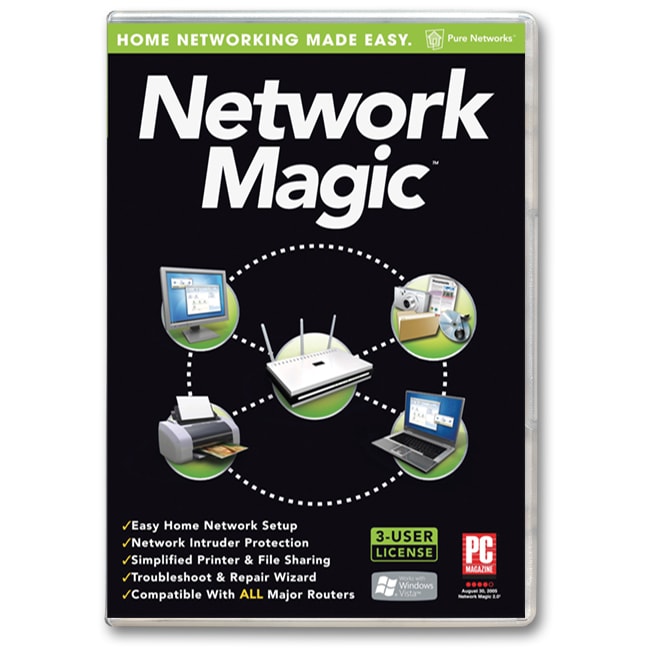
Free Network Magic PRO v.4.8.8142

Networking is hard, no doubt about it. But Network Magic makes it easy to do all the things you want to with the computers and devices in your Home. Things like sharing printers and files across all your computers, monitoring Internet use, and repairing broken internet connections. No more emailing files to yourself just to print them out, no more wondering about where your kids are surfing on the internet, no more waiting around for “the repair guy” to fix your wireless internet.


Pro Features:
Monitor network and web site activity
Test your Internet speed to optimize performance
Connect NAS devices to your network
Access files and folders remotely
New! 6 months of online backup for up to 8 PCs

With Network Magic you can:
Print from any computer in your home
Share files between all your home computers – even Macs & PCs
Monitor Internet use and Web sites visited for any computer in your home
Pinpoint & repair Internet connection problems
View a live map of your network
Protect your wireless network from intruders†

Minimum System Requirements:
Operating system: Microsoft® Windows® Vista™ product line, XP Home Service Pack 1 or 2, XP Pro Service Pack 1 or 2, XP Tablet PC, XP Media Center 2005, XP X64 edition, 2000 Pro SP3 or later, Millennium Edition (ME), Windows 98SE, MAC® OSX
Processor: PC with 450 megahertz or higher processor clock speed recommended. Intel® Pentium®/Celeron® family, or AMD K6™/Athlon™/Duron™ family, or compatible processor recommended
Memory: 128 megabytes (MB) RAM or greater
Network adapter: Wired (Ethernet) or wireless network adapter, with Internet connection
Disk space: 40 megabytes (MB)
Web browser: Microsoft Internet Explorer 5.5 or greater
Windows Installer 2.0 or greater (included in Windows XP or later)

Download Free Network Magic PRO v.4.8.8142

Monday, June 2, 2008

Driver Genius Professional 2007 7.1.0.622

Driver Genius is a professional tool for backing up or restoring the drivers, it can fast detect all the devices in computer and backup the drivers, and it can make the drivers into the zip-compressed format or self-extractor format files. When you reinstall the operation system, you can use restore-drivers function to restore all the drivers. You need only click the mouse, and then the drivers will be installed into your system automatically. Certainly, you can also make the drivers into an auto-install package, in this way, the drivers installation is as simple as the other software installation. It has the simple wizard mode and even beginner can also use it easily.

Main Featuress:
- Quickly backup device drivers for your computer.
- Backup your drivers to a ZIP or EXE self-extracting file.
- Clone your drivers to an auto-setup package.
- Wizard mode allow you step by step backup or restore your drivers.
- Get detailed information about your installed devices.
- Search for drivers for non-internet connected computer.
- Easy to get the most recent drivers for your computer.
- Search all available drivers update by one click.
- Liveupdate your drivers information database online.

Supports: Operating System: Windows 98/98SE/ME/2000/XP/2003/Vista/XP x64/Server 2003 x64/Vista x64


Download Driver Genius Professional 2007 7.1.0.622

Sunday, June 1, 2008

Windows Vista Extreme Edition SP1 with Office 2007 SP1

Windows Vista Extreme Edition SP1 with Office 2007 SP1 | 3.9 Gb
32 Bit Edition | Language : English ( Keyboard layout for all other non-english is supported )

#. Office 2007 SP1 Enterprise Integrated ( genuine copy )
#. Fully Automated Setup you need to choose language, Upgrade option and partition only.
#. Automated Activation, You wont need to connect to internet to activate your windows. It will be done Offline and automatically.
#. Based on windows vista ultimate
#. Winrar and 7zip installed for extraction purposes.
#. No components removed
#. All Windows Ultimate Extras Included.
#. Patched Uxtheme files so u can use any 3rd party themes.
#. 18 selected themes included
#. 65 gadgets included
#. Almost 40 DreamScene Videos & Stardock Deskscapes integrated, and there will be Dreamscene enabled on 1st logon.
#.Some Utilities added for troubleshooting purpose ( For Advanced Users )
#. Nice looking setup .
#. New Default Theme.
#. New Buttons, logon screen.
#. Registry Tweaks for better performance & Visual Effects

Tweaks Included:

#. “Take Ownership” in context menu
#. Additional Avlon Effect ( DWM )
#. Slow Motion Effect ( DWM )
#. PowerOff after shutdown
#. Windows will tell you exactly what it is doing when it is shutting down or is booting ( you can see it on logon screen )
#. Added command prompt to right click context menu
#. Disabled User Account Control ( UAC) [ you can enable this from control panel later. ]
#. Add “Explore from here” context menu while right clicking on folders
#. Get rid of the Windows Mail splash screen
#. Show Super Hidden Files in vista
#. Maximum simultaneous downloads for IE to 20 ( default is 2 )
#. Enable ClearType Tuning
#. Added ‘Copy to Folder’ and ‘Move to Folder’ to right click context menu
#. Added ‘open with notepad’ to right context
#. Disabled Windows Media Player AutoUpdates
#. Added “Advanced System Properties” to right-click on Computer
#. Faster browsing with IE


Recommended System Requirements :

2 GHz CPU ( 800 MHz Minimum )
1 GB RAM ( 256 MB Minimum )
Graphics Card Which Supports Windows AERO ( This is to enable AERO Theme on vista )

Installation :

You can perform 2 types of installation, either by booting this DVD or by clicking on “setup.exe”. Both ways installation will be automated.
Upgrade Option is available, so u can upgrade your XP to this vista edition.

Activated & Genuine Copy:

This copy of windows will be activated during last phase of installation. and it also will be genuine. so u dont need to activate is manually. You can also update your windows with Microsoft updates without any problem.
Also , office 2007 sp1 included is also genuine!

Click here for download Windows Vista Extreme Edition SP1 with Office 2007 SP1