Tuesday, September 18, 2007

SQLYog Enterprise Edition v6.07 - Final


SQLyog MySQL GUI is the most popular MySQL Manager and MySQL Admin Tool, combining the features of MySQL Query Browser, phpMyAdmin and various other MySQL Front Ends and MySQL Clients in a single intuitive interface.

Enhanced Productivity
* Smart Autocomplete

Advanced Connectivity Options
* HTTP/HTTPs Tunneling
* SSH Tunneling

Migration Tools
* Wizard Driven Migration Toolkit
* Import task can be scheduled for transferring data at regular intervals

Synchronization Tools
* Structure Synchronization
* Checksum based Network Efficient Data Synchronization
* Data Synchronization can be scheduled

Other Power Tools
* Scheduled Backups
* Notification Services
* Job Manager

Developer / User Productivity
* Favorites Manager
* HTML Schema Documentation
* Shortcuts to quickly generate SQL statements and paste object names
* Learn MySQL by looking at the SQL generated by SQLyog
* Multi-tab Query Editor and Result-set Editor
* Multiple Query Execution
* Multi-threaded Query execution with option to stop long running queries
* SQL Templates
* Excel-style grid interface to view/update resultsets
* Multi-format Blob editor
* View data in Grid/Text Mode
* ResultSet/Data Export to CSV/XML/HTML
* Full Support from 3.23.38 to the latest 5.x
* Support for all MySQL table handlers
* Excel friendly resultsets/table-data export to clipboard/file
* Dialogless table and resultset editor

DBA Productivity
* Restoring / Importing large SQL dumps
* MySQL 5.x objects support
* User Management
* Managing hosted MySQL
* Connection Manager
* Index Management
* Relationship/Foreign Key Manager
* Reorder Columns
* Copy objects to another Host with single click
* Table diagnostics
* Flush Tools
* Object Browser
* Creating/dropping database
* Optimized for managing Hosted MySQL
* Profiling
* Multiple database connections

Technology
* Turbo Speed MySQL Management. Uses native MySQL C API - the fastest way to communicate with MySQL server
* 100% keyboard friendly
* Small compact binary
* Minimal use of Registry - easy migration of User Preferences by dragging and dropping config files.
* Non-cluttered look and feel, ability to show/hide panes

Supported Platforms
* Windows 98/ME/2K/XP/2003/Vista

Download : SQLYog Enterprise Edition v6.07 - Final
Password : just4you


Monday, September 17, 2007

DVDFab Platinum 3.1.4.0


DVDFab Platinum is all you need to backup DVDs. DVDFab Platinum 3 is brand new, is completely rewritten, is based on 5 years of DVD copy software development.
DVDFab is simply the easiest way to copy a DVD movie. Just insert the movie and a blank DVD then press Start. Your entire movie - including menus, trailers and special features - is copied to a single DVD with just one click, and everything happens automatically.
Backup your entire DVD - including menus, trailers, and special features - onto one or multiple discs.

FEATURES:
A. DVD to DVD
1. 5 DVD to DVD copy mode available: Full Disc, Main Movie, Split, Customize and Clone.
2. Full Disc: All movies, menus and trailers, is copied to a DVD with just one click.
3. Main Movie: Just copy the movie, with specific audio/subpicture.
4. Split: Copy a DVD-9 onto two DVD-5 discs with 100% quality, and preserve original menus on both discs. Ideal for episodic/season DVD movies, TV series, etc.
5. Customize: Personalize your DVDs! Want to make a DVD with only your favorite titles? How about cutting out those annoying commercials? Or selecting specific audio/subpicture? No problem! You can select just your favorite titles, specify the title playback order, with or without original menus, to create a DVD with only the stuff you want!
6. Clone: Make perfect 1:1 bit-to-bit copy of DVDs:
--- Make perfect dual layer DVD copy by using the original layer break position.
--- Copy data DVD disc, like PS2 DVD.
7. Very fast copying speed, normally it's about 10 - 20 minutes.
8. Burn to any blank DVD Disc (DVD+R/RW, DVD-R/RW, DVD+R DL, DVD-R DL).

B. DVD to Mobile
1. 3 DVD to Mobile copy mode available: Generic, iPod and PSP. More devices support can be added manually.
2. Generic: Convert DVD title to PC MPEG-4/DivX/XVID/H.264 AVI/MP4 file.
3. iPod: Convert DVD title to Apple iPod MPEG-4/H.264 MP4 file.
4. PSP: Convert DVD title to Sony PSP MPEG-4/H.264 MP4 file.

C. Benefits
1. Remove all DVD copy protections, like CSS, RC, RCE, APS, UOPs, ARccOS, RipGuard, FluxDVD, CORE X2, etc.
2. Constantly updated to support latest DVD copy protections.
3. Backup scratched/dirty disc:
--- Even if some information (IFO) cannot be read, you can still copy Main Movie or Customize.
--- Recovery from DVD reading (VOB) error.
4. Constantly updated to support latest DVD burners and blank DVD discs.
5. Constantly updated to support more mobile devices.
6. FREE lifetime upgrade.
7. FREE lifetime support via e-mail, worldwide.

Works on Windows Vista/XP/2000/98/ME.

Changes in DVDFab Platinum 3.1.4.0 (06/27/2007):
- New: Reduced time to open DVD (like SAW III) up to 50 percent.
- Fix: A/V sync problem for "DVD to Mobile", as found on "Alien" and "Aliens".
- Fix: A crash problem when choosing "sub/idx" subtitle for "DVD to Mobile".
- Fix: A problem in dgp file created for Nintendo DS.

Download : KasperSky Internet Security 7.0.125


Deep Freeze 6.1


Deep Freeze instantly protects and preserves baseline computer configurations. No matter what changes a user makes to a workstation, simply restart to eradicate all changes and reset the computer to its original state - right down to the last byte. Expensive computer assets are kept running at 100% capacity and technical support time is reduced or eliminated completely. The result is consistent trouble-free computing on a truly protected and parallel network, completely free of harmful viruses and unwanted programs.

Apart from the System Restore function in Windows, there used to be no other way to completely restore a bug free configuration of your PC after a major problem hit. What's more, System Restore only enables you to go back a maximum of a few days to a previous clean configuration. Deep Freeze, on the other hand, enables you to protect and preserve clean computer configurations so that you can always restore your PC in the event of a major crash. No matter what changes you make to your computer, you can simply restart to eradicate all changes and reset the computer to its original state. The program is useful for anyone who has suffered software conflicts, operating system corruption and virus attacks.


After the simple installation procedure, you are asked whether you want to activate Deep Freeze, which will run a quick scan to "freeze" the computer in that state. You can then use the computer as you would normally but every time it is turned off, it will be returned to its original state. If at a later date you decide you want to make a permanent change you can temporarily disable Deep Freeze. The positive side of Deep Freeze is that it doesn't impede the use of your computer in anyway. You can mess around with your PC as much as you want, installing and reinstalling programs and even deleting essential Windows files without worrying about the consequences. The downside is that if you forget to deactivate it, any work you've done or any essential changes you have made will be lost for good. It's therefore advisable to save essential files or documents on an external drive when Deep Freeze is activated. You can also save to a special "thawed" section of your hard drive that is exempt from restoration.

Whilst useful for those who share a computer or administer a network of computers, Deep Freeze is somewhat impractical on a lone PC. However, if you like to save all your data to external sources, it's a pretty solid assurance that your PC won't be rendered useless by a major crash. Deep Freeze is currently available in two editions for Windows, Mac OS X and Windows Server with a Linux edition in the pipeline.

Download : Deep Freeze 6.1


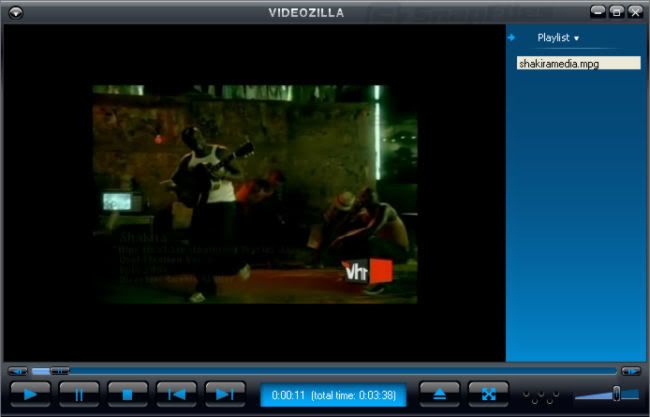
VIDEOzilla 2.7


Videozilla is a complete video conversion tool for video files AVI, MPEG, RM, MOV, ASF, WMV, SWF, FLV, MPEG 4 (IPOD/PSP/Mobile), M4V, 3GP, 3G2 via a right-click menu on the selected video files. With as simple as a click, videozilla offers a simple and clean solution to converting video files into other format. Options can be set for start and end points of a video; video width and height; video and audio quality; plenty of codecs choices are available.

Videozilla also perform audio extraction from a video and save as audio MP3 or WAV. Just right-click any video files on Windows Explorer and click convert on the context menu shown, videozilla will immediately convert the video files to another video formats or extract as only audio formats. Command-Line based video conversion is also supported.

Software Features:
• Convert to AVI Video
• Convert to MPEG Video
• Convert to MPEG-4 Video (IPOD/PSP/Mobile) - new
• Convert to 3GP Video - new
• Convert to WMV Video
• Convert to RealMedia Video
• Convert to FLASH Video
• Support ASF Video
• Support MOV 6 / 7 Video
• Support AVI Video
• Support MPEG Video
• Support MPEG-4 Video (IPOD/PSP/Mobile)
• Support 3GP Video
• Support WMV Video
• Support RealMedia Video
• Support Flash 8 SWF
• Support Flash 8 FLV
• Support Flash MX SWF
• Support Flash MX FLV
• Support Flash 3-6 SWF
• Support Flash Vector SWF
• Right-Click convert from Windows Explorer
• Extract video to MP3 audio
• Extract video to WAV audio
• Advanced Video Player (Screenshot)
• Preview the video when converting
• Command-Line video conversion
• 64-bit Windows supported
• Windows Vista Ready - new

The major supported video formats are:
• AVI (DivX, XviD, MS MPEG-4, Uncompressed, Cinepak and other)
• MPEG (MPEG (MPEG-1 and MPEG-2 Video, VCD and SVCD, PAL, and NTSC)
• MPEG-4 format (Mobile, PSP, IPOD, MOV 7)
• 3GP format (3GP, 3G2)
• WMV (Windows Media Video)
• RM (Real Networks Video)
• DVD format
• ASF format
• QuickTime MOV format
• Flash 8 SWF format
• Flash 8 FLV format
• Flash MX SWF format
• Flash MX FLV format
• Flash 3-6 SWF format
• Flash Vector SWF format

Works on Windows 98, ME, XP, 2000, 2003, Vista

Changes in version 2.6:
- Now Support Flash 8, MPEG-4 (IPOD/PSP/Mobile) and 3GP

Download : VIDEOzilla 2.7


Digital Media Converter


Digital Media Converter makes it easy for you to convert your video and audio files from one format to another. Now you can organize and batch convert all your video and audio files between: VCD, DVD, AVI (DivX, MS MPEG4, uncompressed, etc), MPEG-1, MPEG-2 (PAL, NTSC), MP3, MOV, WMA, WMV, DVR-MS, and WAV formats. Making DVD format files is simple with Digital Media Converter. You can do even more, such as extracting the audio from the video and saving just the audio tracks. You can use the advanced settings to change the video frame size, audio/video compression codec, frequency, and the number of channels in an audio stream. The program's mass conversion capability lets you multi-select files and add entire folders for conversion.


With Digital Media Converter, you can:
• Convert between DVD, VCD, Audio CD, AVI (DivX, MS MPEG4, uncompressed), MPEG-1, MPEG-2 (PAL, NTSC), MP3, 3GP, MOV, WMV, WMA, DVR-MS, and WAV.
• Multi-select files and entire folders for batch conversion.
• Extract the sound tracks from movie files into MP3s.
• Increase the volume of converted files up to 400%.
• Reduce file sizes.
• Auto detect and fix many types of file format problems during conversion.
• Split files into smaller parts, either at selected points or automatically by file size or time duration.
• Change audio and video properties independently.
• Retain ID3 tags like author, title, artist, and album when encoding to Windows Media formats (WMV and WMA) and MP3.
• Convert DVR-MS files created by Windows Media Center.
• Transfer media files to your Apple iPod or Sony PSP.
• Convert DVD video between PAL and NTSC standards.
• Adjust the brightness and contrast of video files.
• Change video frame size.
• Retain the aspect ratio of video files even if you change their dimensions.
• Change the number of audio channels.
• Search for audio and video files on your computer and mass-convert the files you find.

Download : Digital Media Converter